The Nomad Tech Kit: 7 Accessories That Make Remote Work Possible in 2026
Building a digital nomad tech kit is essential for anyone who wants to work remotely while traveling in 2026. The right travel tech accessories can help you stay productive, connected and organized wherever you go.
The same gaps appear in most nomads’ setups: battery anxiety, too few ports, no backup and background noise on client calls. Each item below solves one of them. Our rough prices are US ranges and change by region and seller, and the full kit costs about $230–360, so build it in stages.
Replace several chargers with one small one
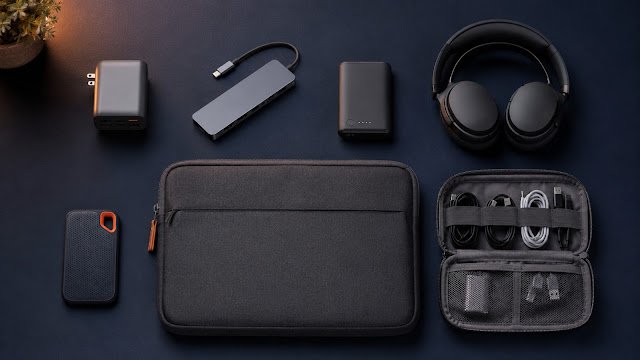
GaN (gallium nitride) chargers are much smaller than a standard laptop brick and can charge a laptop, phone and tablet from one plug. For most nomads, it is the most useful single accessory in the kit.
Most GaN chargers accept 100–240V, so the voltage is not a problem anywhere in the world. You still need a plug adapter for the local socket shape unless your charger’s plug already fits, so pack a compact travel adapter as well.
One port becomes a full set of connections
Many ultraportables have only two USB-C ports, and a hub adds HDMI for a coworking monitor, USB-A for older peripherals, Ethernet for a stable wired connection and an SD card reader. It also lets you charge through the hub so you don’t lose a port.
It earns its place in coworking spaces with monitors, hotels with Ethernet but weak Wi-Fi, and offices that still ask for a USB drive.
A backup for café, airport and power cuts
A 20,000 mAh power bank is about 74 Wh, which is under the usual 100 Wh airline limit. A model with 65W USB-C output can give a laptop a useful top-up, and it keeps you online during power cuts and in cafés with no free socket.
Check the Wh rating on the product page, not only the mAh. Power banks go in your carry-on, never in checked luggage.
🚫 Airline rules changed: don’t plan to use it in the air
Since 2025, many airlines have banned using or charging power banks in flight, including Emirates, Singapore Airlines and Scoot, Thai Airways, Qantas and Jetstar, and the Lufthansa Group. Several also limit you to one or two power banks, and a few refuse anything over 100 Wh. Some carriers, such as Ryanair, still allow use at cruise altitude. Power banks between 100 and 160 Wh generally need airline approval, and anything over 160 Wh is banned. Check your airline’s rules before you fly, charge your devices before boarding, and use seat power if your airline allows it. See our guide to the best power banks for digital nomads.
Focus in cafés and on flights
Active noise cancellation (ANC) reduces the noise you hear, which helps you concentrate in cafés, coworking spaces and airports. It does not automatically clean up what your client hears: that depends on the microphone and the call software’s noise suppression.
Budget ANC headphones from brands such as Anker cost around $50–80. Premium models, such as Sony’s WH-1000 series, cost several times more and are usually better for calls.
Your backup against theft, damage and failure
A 1 TB portable SSD such as the Samsung T7 is small, light and fast enough to back up a laptop. Laptops get stolen, dropped and damaged, and a backup kept separately is what saves your client files, visa documents and bank statements.
Set up automatic backups with Time Machine on a Mac or File History on Windows, and encrypt the drive. Keep the SSD in a different bag or room from your laptop, and consider a cloud copy of your most important files too. A first full backup can take 20 minutes or more.
The cheapest protection in your kit
A padded sleeve protects your laptop from knocks, scratches and spills inside any bag. Neoprene is water-resistant, not waterproof, so it helps in a light shower but won’t save a laptop from a flooded bag.
Get the right size, because a sleeve that is too large lets the laptop slide and the corners still take the impact.
Find everything in seconds
A small organizer keeps your charger, hub, cables and SSD in one place, which makes airport security and café setups quicker. It also stops cables from tangling and getting damaged in your bag.
Bonus pick for long work sessions
A foldable stand raises your screen to eye level and cuts neck strain during long sessions, such as a long visa application or back-to-back video calls. Good ones weigh around 250–300 g and fold flat into your pouch.
📋 Complete Kit Summary
| # | Accessory | Problem solved | Rough price |
|---|---|---|---|
| 01 | GaN Charger 65W | One charger instead of three | $25–45 |
| 02 | USB-C Hub 7-in-1 | HDMI, Ethernet and USB-A from one port | $25–40 |
| 03 | Power Bank 20,000 mAh | Backup power at airports, cafés and in power cuts | $35–55 |
| 04 | Noise-Cancelling Headphones | Focus anywhere | $50–80 budget |
| 05 | Portable SSD 1TB | Backup against theft and failure | $70–90 |
| 06 | Water-Resistant Sleeve | Protection from knocks and light rain | $15–30 |
| 07 | Cable Organizer Pouch | Everything in one place | $12–20 |
| +1 | Foldable Laptop Stand | Ergonomics on long sessions | $15–25 |
Total for the 7 core items: about $230–360, depending on brands. With the stand, about $245–385.
Hardware sorted. These services keep you connected and covered. Some links are affiliate links.
Keep Reading
Build the Kit in This Order
Buy first: a GaN charger, a USB-C hub and a cable organizer. These three cost roughly $60–105 together and fix the most common daily problems: charging, connections and clutter.
Buy next: noise-cancelling headphones and a water-resistant sleeve. They protect your focus on calls and your hardware in transit.
Buy when budget allows: a portable SSD and a power bank. You won’t use them every day, but the day your laptop is stolen or the power cuts out, you’ll be glad they’re in the bag. Just don’t count on using the power bank in the air.